UNLang Node (LangNode) is the fundamental object. All visualized node of UNLang should be inherit from UNLang Node.
What’s LangNode
LangNode is just like an electronic component with input/output pins. The signal triggers the input pin, then the whole LangNode is running. While the LangNode runs or terminate, it could trigger the signals to the output pins.
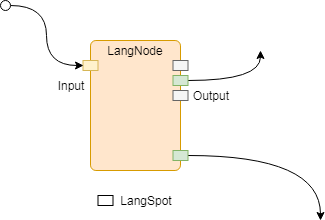
LangSpot
LangSpot is the node pin. A customized module should define how many input or output LangSpots. Then UNLang could visualize the module in editor and standard the operations on the module.
public sealed class LangSpot |
| Parameter | Description |
|---|---|
name |
LangSpot name. |
category |
The connection value type. Details please check LangType.Category. |
owner |
The LangSpot owner, it always be this. |
capacity |
How many connections to the LangSpot at the same time. |
type |
The LangSpot type. It could be In (Input) or Out (Output). |
NodeInterface
Using NodeInterface attribute, user could define the visual result of a module in UNLang editor.
NOTE:
NodeInterfaceis a required option for a module.
Implement Your Module
LangNode and LangSpot standard the basic component and operation for a module.
Let’s implement a basic module in UNLang by using UnityEngine.Debug to show a constant string Hello UNLang!.
[] |
What the user need to do is:
- Firstly, override
Initmethod to define theLangSpotof the module.Example code define one
LangSpot.Showis theLangSpotname;Anymeans the LangSpot could connect any type value from the up-stream;thisis the owner of theLangSpot;-1means it could be connected with any count lines at the same time;Inmeans it’s an input spot. - Secondly, handle the logic in
OnSignalmethod.Example code check if the spot type is
In, then printHello UNLang!string in console window. - Finally, use
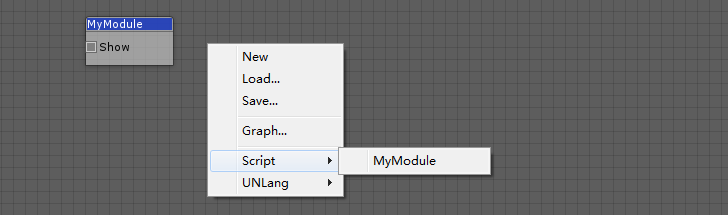
NodeInterfaceattribute to define the module name and category in UNLang editor.Example code define the module name is
MyModuleand it is underScriptmenu.
The following snapshot is MyModule in UNLang editor: