让我们在Unity的console窗口中打印
Hello UNLang!。
① 创建Hello UNLang!脚本
- 切回到Unity编辑器,你会看到
UNLang/IDE...菜单。
- 打开
IDE窗口。 - 右键点击
IDE窗口,你会在右键菜单中看到所有可以执行的操作。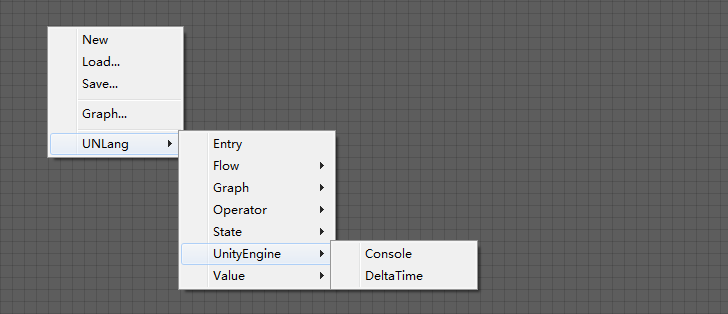
- 添加
Entry,Constant和Console模块,然后如下图连接: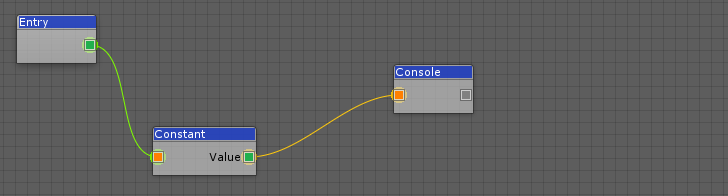
- 选中
Constant模块,在Inspector窗口中选择String类型,然后输入Hello UNLang!。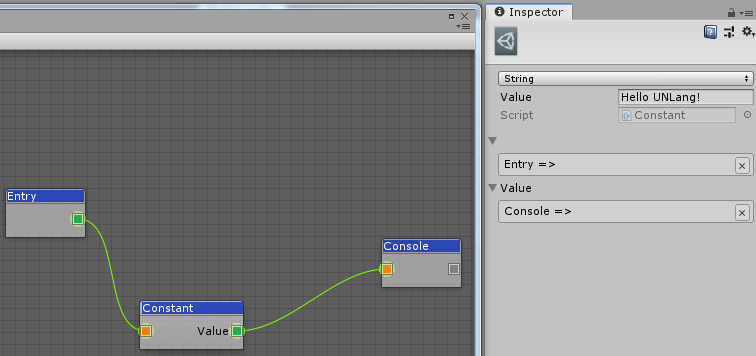
- 在右键菜单中存储脚本到本地项目中,例如
[UnityProject]/Assets/Resources/1.bytes。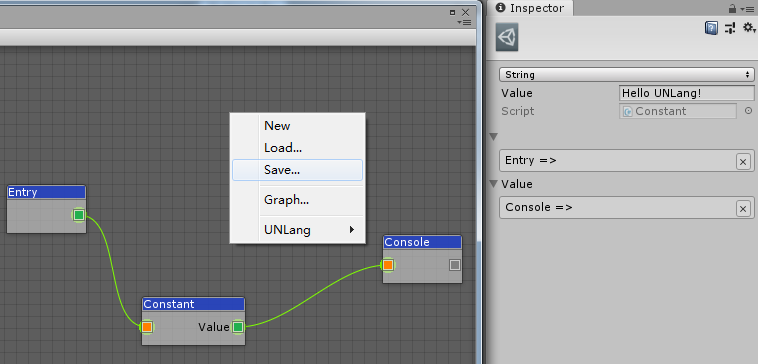
② 执行脚本
- 在激活的场景中创建一个GameObject。
- 挂接一个空的MonoBehaviour。
在这个空的MonoBehaviour中添加如下代码:
using UnityEngine;
using UNLang;
using UNode;

public class NewBehaviourScript : MonoBehaviour
{
    // UNLang的实例,用来执行脚本。
    private LangInstance instance = null;

    void Start()
    {
        // 接管装载器,因为我们把脚本文件存放在了Resources目录下了。
        NodeLoader.Load = file =>
        {
            // 移除"Resources"相对路径以及文件扩展名。
            file = file.Replace("/Resources/", "");
            file = file.Substring(0, file.IndexOf("."));
            return Resources.Load<TextAsset>(file).bytes;
        };

        // 创建UNLang实例。
        this.instance = new LangInstance();
        // 装载脚本文件"1.bytes"。
        this.instance.Load("1.bytes");
        // 执行"Entry"模块作为入口。
        this.instance.Run<Entry>();
    }

    void Update()
    {
        // 更新UNLang实例。
        this.instance?.Update();
    }
}
运行并在Unity的console窗口中看到
Hello UNLang!,那么恭喜!